Appearance
KeyboardViewModel 设计
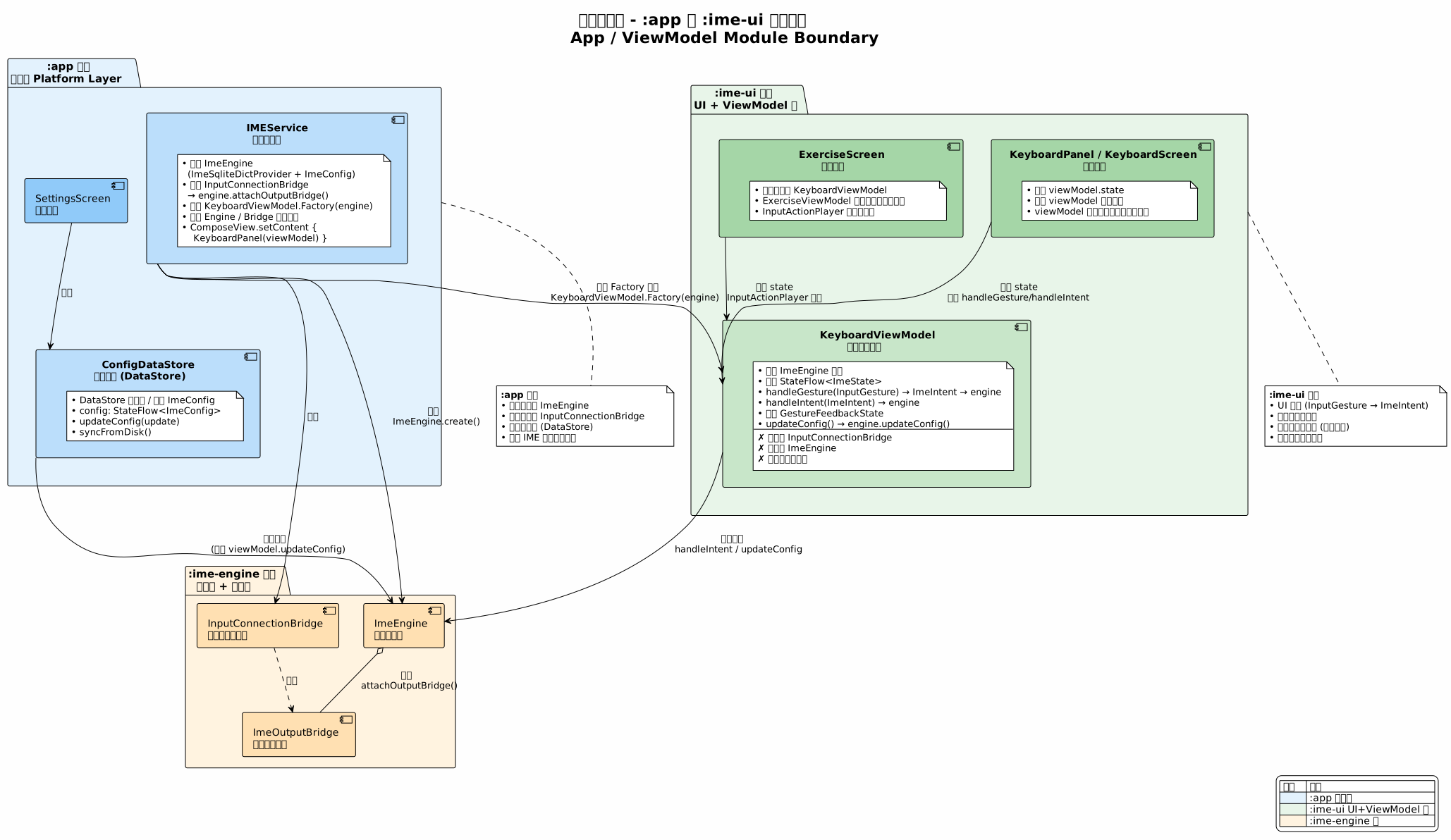
v4 版本将 KeyboardViewModel 划归 :ime-ui 模块,作为 UI 层的协调中心,桥接 Compose UI 组件与 :ime-engine 引擎。KeyboardViewModel 仅依赖引擎核心模型,桥梁由 :app 的 IMEService 管理,确保 :ime-ui 作为纯 UI 库可被第三方应用即插即用。
1. 设计定位
1.1 模块归属
KeyboardViewModel 属于 :ime-ui 模块的 viewmodel/ 包,是 UI 层(UI Layer + ViewModel Layer)的核心组件。
归属理由:
| 理由 | 说明 |
|---|---|
| 职能本质是 UI 协调 | ViewModel 将 UI 手势(InputGesture)转换为引擎意图(ImeIntent),暴露引擎状态(StateFlow<ImeState>)供 Compose 订阅——这些职能完全属于 UI 层 |
| 仅依赖引擎公开 API | ViewModel 仅持有 ImeEngine 引用,使用其 handleIntent()、state、updateConfig() 等公开 API,不依赖引擎内部实现 |
| 第三方应用需要 | 任何引入 :ime-engine + :ime-ui 的第三方应用都需要 KeyboardViewModel 来驱动 UI。如果 ViewModel 在 :app,第三方应用必须自行实现等价组件,违背「即插即用」的设计目标 |
| Compose 组件的直接搭档 | KeyboardPanel、KeyboardScreen、ExerciseScreen 等集成组件均以 ViewModel 为交互入口,二者同属 UI 层、同生同灭 |
1.2 不属于 ViewModel 的职责
以下职责由 :app 模块承担,KeyboardViewModel 不参与:
| 职责 | 承担者 | 说明 |
|---|---|---|
创建 ImeEngine | :app(IMEService) | ImeEngine.create() 需要 ImeDictProvider(Android Context 依赖),由应用层创建后传入 ViewModel |
管理 InputConnectionBridge | :app(IMEService) | 桥梁直接挂载到 ImeEngine,与 ViewModel 无关;IMEService 在 onStartInput/onDestroy 时管理桥梁生命周期 |
| 配置持久化 | :app(ConfigDataStore) | DataStore 读写是应用层职责;ViewModel 仅通过 engine.updateConfig() 修改运行时配置 |
| 系统输入法服务生命周期 | :app(IMEService) | InputMethodService 的 onCreate/onDestroy/onStartInput 回调属于平台层 |
1.3 与 :app 模块的职责边界
2. 类设计
2.1 KeyboardViewModel
kotlin
package org.crazydan.studio.ime.ui.viewmodel

/**
 * 键盘视图模型,`:ime-ui` 模块的 UI 协调中心。
 *
 * 桥接 Compose UI 组件与 `:ime-engine` 引擎:
 * - 将 UI 手势(InputGesture)转换为引擎意图(ImeIntent)
 * - 暴露引擎状态(StateFlow<ImeState>)供 Compose 订阅
 * - 管理手势反馈状态(GestureFeedbackState)
 * - 提供运行时配置修改接口
 *
 * ViewModel 仅依赖引擎核心模型。
 * 平台级职责(ImeEngine 创建、InputConnectionBridge 管理、配置持久化)
 * 均由 `:app` 模块承担。
 *
 * 使用方式:
 * ```kotlin
 * // :app 模块的 IMEService 中创建
 * val engine = ImeEngine.create(
 *     config = ImeConfig(...),
 *     dictProvider = ImeSqliteDictProvider(context),
 * )
 * engine.attachOutputBridge(InputConnectionBridge { currentInputConnection })
 *
 * val viewModel: KeyboardViewModel = viewModel(
 *     factory = KeyboardViewModel.Factory(engine)
 * )
 * KeyboardPanel(viewModel = viewModel)
 * ```
 */
class KeyboardViewModel(
    private val engine: ImeEngine,
) : ViewModel() {

    // ─── 状态暴露 ────────────────────────────────────────────────

    /** 引擎状态,供 Compose 订阅 */
    val state: StateFlow<ImeState> = engine.state

    /** 当前 ImeConfig 快照,便于 UI 组件快速访问 */
    val config: ImeConfig get() = state.value.config

    // ─── 手势反馈状态 ────────────────────────────────────────────

    /**
     * 手势反馈状态,独立于 ImeState。
     *
     * 由 GestureInputPanel 的手势事件驱动更新,
     * 供 GestureFeedbackPanel 消费渲染。
     *
     * 反馈状态与 ImeState 分离:
     * - ImeState 描述键盘的逻辑状态(哪个键被选中、候选项列表等)
     * - GestureFeedbackState 描述手势的视觉反馈(滑行轨迹、临时高亮等)
     *
     * 这种分离确保了反馈状态的高频更新不会触发 ImeState 的变更,
     * 避免不必要的按键面板重组。
     */
    val feedbackState = GestureFeedbackState()

    // ─── 手势与意图处理 ──────────────────────────────────────────

    /**
     * 处理输入手势。
     *
     * 将 InputGesture(UI 面板的输出)转换为 ImeIntent(引擎的输入),
     * 然后委托引擎执行 reduce。
     *
     * 两层转换的意义:
     * - InputGesture 表达「用户做了什么手势」,属于输入面板的领域
     * - ImeIntent 表达「系统应该做什么」,属于 ViewModel/引擎的领域
     * - 同一手势可以根据当前键盘状态产生不同的 Intent
     * - 不同手势也可以产生相同的 Intent
     */
    fun handleGesture(gesture: InputGesture) {
        val intent = gestureToIntent(gesture)
        engine.handleIntent(intent)
    }

    /**
     * 处理意图。
     *
     * 直接发送 ImeIntent 到引擎,适用于:
     * - UI 组件的直接操作(如候选选择、光标移动、键盘切换)
     * - InputActionPlayer 的程序化输入
     * - 配置变更(UpdateConfig)
     */
    fun handleIntent(intent: ImeIntent) {
        engine.handleIntent(intent)
    }

    // ─── 配置修改 ────────────────────────────────────────────────

    /**
     * 更新运行时配置。
     *
     * 委托引擎更新 ImeConfig,UI 通过 ImeState.config 自动同步。
     * 运行时修改始终优先于持久化配置(详见 ImeConfig 设计文档)。
     *
     * 注意:此方法仅修改运行时配置,不做持久化。
     * 持久化由 `:app` 模块的 ConfigDataStore 负责。
     */
    fun updateConfig(transform: (ImeConfig) -> ImeConfig) {
        engine.updateConfig(transform)
    }

    // ─── 生命周期 ────────────────────────────────────────────────

    override fun onCleared() {
        super.onCleared()
        // ViewModel 不负责销毁引擎——引擎的生命周期由 :app 管理
        // 此处仅清理 ViewModel 自身资源
        feedbackState.clear()
    }

    // ─── 内部实现 ────────────────────────────────────────────────

    /**
     * 将 InputGesture 转换为 ImeIntent。
     *
     * 转换逻辑可能根据当前键盘状态产生不同的 Intent,
     * 例如:同一 Tap 手势在 PinyinInput 状态下产生 PressKey,
     * 在 CandidateSelection 状态下可能产生 SelectCandidate。
     */
    private fun gestureToIntent(gesture: InputGesture): ImeIntent {
        return when (gesture) {
            is InputGesture.Tap -> ImeIntent.PressKey(gesture.key, KeyGesture.Tap)
            is InputGesture.LongPress -> ImeIntent.PressKey(gesture.key, KeyGesture.LongPress)
            is InputGesture.Swipe -> ImeIntent.PressKey(gesture.endKey, KeyGesture.Swipe)
            is InputGesture.Flip -> ImeIntent.PressKey(
                gesture.startKey,
                KeyGesture.Flip(gesture.direction),
            )
            is InputGesture.XPadZonePath -> ImeIntent.SelectXPadPath(
                gesture.startZone,
                gesture.path,
            )
            is InputGesture.CandidateTap -> ImeIntent.SelectCandidate(
                /* 根据 gesture.index 从当前候选列表中获取 */
            )
        }
    }

    // ─── 工厂 ────────────────────────────────────────────────────

    /**
     * ViewModel 工厂,由 `:app` 模块提供预创建的 ImeEngine。
     *
     * ```kotlin
     * // IMEService 中
     * val factory = KeyboardViewModel.Factory(engine)
     * val viewModel: KeyboardViewModel = viewModel(factory = factory)
     * ```
     */
    class Factory(
        private val engine: ImeEngine,
    ) : ViewModelProvider.Factory {
        @Suppress("UNCHECKED_CAST")
        override fun <T : ViewModel> create(modelClass: Class<T>): T {
            return KeyboardViewModel(engine) as T
        }
    }
}2.2 GestureFeedbackState 清理
kotlin
/**
 * GestureFeedbackState 补充清理方法。
 * 在 ViewModel.onCleared() 时调用,释放反馈状态资源。
 */
class GestureFeedbackState {
    // ... 现有字段 ...

    /** 清理所有反馈状态,在 ViewModel 销毁时调用 */
    fun clear() {
        _touchTrailPoints.value = emptyList()
        _highlightedKeys.value = emptySet()
        _fingerIndicator.value = null
        _xPadPathHighlight.value = null
    }
}3. 与集成组件的协作
3.1 KeyboardPanel(叠加模式)
kotlin
@Composable
fun KeyboardPanel(viewModel: KeyboardViewModel) {
    val state by viewModel.state.collectAsStateWithLifecycle()
    val feedbackState = viewModel.feedbackState
    var keyPanelLayout by remember { mutableStateOf(KeyGridPanelLayoutInfo()) }

    KeyboardTheme(themeType = state.config.ui.themeType) {
        Column(modifier = Modifier) {
            // 候选栏
            CandidateListPanel(
                state = state.candidateList,
                onCandidateSelected = { candidate ->
                    viewModel.handleIntent(ImeIntent.SelectCandidate(candidate))
                },
            )

            // 输入栏
            InputListPanel(
                state = state.inputList,
                onGapTapped = { index ->
                    viewModel.handleIntent(ImeIntent.MoveCursorTo(index))
                },
            )

            // 三层面板叠加区域
            Box {
                // 底层:按键面板
                KeyGridPanel(
                    keyboardType = state.keyboardType,
                    keyGrid = state.keyGrid,
                    keyboardState = state.keyboardState,
                    onLayoutInfoChanged = { keyPanelLayout = it },
                )

                // 中层:反馈面板
                GestureFeedbackPanel(
                    elements = GestureFeedbackPanelSet.OverlaySet.allElements,
                    feedbackState = feedbackState,
                    keyPanelLayout = keyPanelLayout,
                )

                // 顶层:输入面板
                GestureInputPanel(
                    keyPanelLayout = keyPanelLayout,
                    keyboardType = state.keyboardType,
                    feedbackState = feedbackState,
                    onGesture = { viewModel.handleGesture(it) },
                )
            }

            // 工具栏
            Toolbar(
                keyboardType = state.keyboardType,
                config = state.config,
                onSwitchKeyboard = { viewModel.handleIntent(ImeIntent.SwitchKeyboard(it)) },
            )
        }
    }
}3.2 InputActionPlayer 协作
InputActionPlayer 通过 KeyboardViewModel 发送 ImeIntent:
kotlin
class InputActionPlayer(
    private val viewModel: KeyboardViewModel,
    private val feedbackState: GestureFeedbackState,
    private val positionResolver: KeyPositionResolver,
    private val scope: CoroutineScope,
) {
    // ... 现有设计不变 ...

    private fun executeAction(action: InputAction) {
        when (action) {
            is InputAction.KeyDown -> {
                val position = positionResolver.resolve(action.key) ?: return
                feedbackState.setFingerIndicator(FingerIndicatorState(
                    position = position, pressed = true, visible = true
                ))
                viewModel.handleIntent(ImeIntent.PressKey(action.key, KeyGesture.Tap))
            }
            is InputAction.SwipeTo -> {
                // ...
                viewModel.handleIntent(ImeIntent.PressKey(action.toKey, KeyGesture.Swipe))
            }
            is InputAction.SelectCandidate -> {
                // ...
                viewModel.handleIntent(ImeIntent.SelectCandidate(/* ... */))
            }
            is InputAction.SwitchKeyboard -> {
                viewModel.handleIntent(ImeIntent.SwitchKeyboard(action.targetType))
            }
            // ... 其他动作 ...
        }
    }
}3.3 ExerciseScreen 协作
kotlin
@Composable
fun ExerciseScreen(
    viewModel: KeyboardViewModel,
    exerciseViewModel: ExerciseViewModel,
    onBack: () -> Unit,
) {
    // ...
    // 复用同一个 KeyboardViewModel 实例,
    // ExerciseViewModel 仅管理练习相关的额外状态
}设计决策:
ExerciseScreen复用KeyboardViewModel而非创建新的 ViewModel。练习功能通过InputActionPlayer程序化驱动KeyboardViewModel.handleIntent(),与用户手动操作走同一路径,确保练习过程与真实输入行为完全一致。ExerciseViewModel仅管理练习特有的状态(目标文本、进度、方法选择等),不重复引擎交互逻辑。
4. :app 模块的集成方式
4.1 IMEService 中的组装
IMEService 是 :app 模块的平台入口,负责创建引擎、挂载桥梁、注入 ViewModel:
kotlin
class IMEService : InputMethodService() {
    private var engine: ImeEngine? = null
    private var bridge: InputConnectionBridge? = null
    private var composeView: ComposeView? = null

    override fun onCreate() {
        super.onCreate()
        // 创建引擎
        engine = ImeEngine.create(
            config = ImeConfig(),
            dictProvider = ImeSqliteDictProvider(this),
        )
        // 创建并挂载输出桥梁
        bridge = InputConnectionBridge { currentInputConnection }
        engine?.attachOutputBridge(bridge!!)
    }

    override fun onCreateInputView(): View {
        val engine = this.engine ?: error("Engine not initialized")
        return ComposeView(this).also { composeView = it }.apply {
            setViewCompositionStrategy(
                ViewCompositionStrategy.DisposeOnViewTreeLifecycleDestroyed
            )
            setContent {
                val viewModel: KeyboardViewModel = viewModel(
                    factory = KeyboardViewModel.Factory(engine)
                )
                KeyboardPanel(viewModel = viewModel)
            }
        }
    }

    override fun onDestroy() {
        // 断开桥梁并销毁引擎
        engine?.detachOutputBridge()
        engine = null
        bridge = null
        composeView?.disposeComposition()
        composeView = null
        super.onDestroy()
    }
}关键设计:
| 步骤 | 说明 |
|---|---|
onCreate 创建引擎 | 引擎在 Service 创建时初始化,确保 onCreateInputView 时引擎已就绪 |
onCreate 挂载桥梁 | InputConnectionBridge 在引擎创建后立即挂载,确保输入提交流程完整 |
onCreateInputView 注入 ViewModel | 通过 KeyboardViewModel.Factory(engine) 将预创建的引擎注入 ViewModel |
onDestroy 断开桥梁 | 先断开桥梁再清空引用,确保无悬挂回调 |
| ViewModel 不持有桥梁 | 桥梁由 IMEService 管理,与 ViewModel 生命周期独立 |
4.2 配置持久化协作
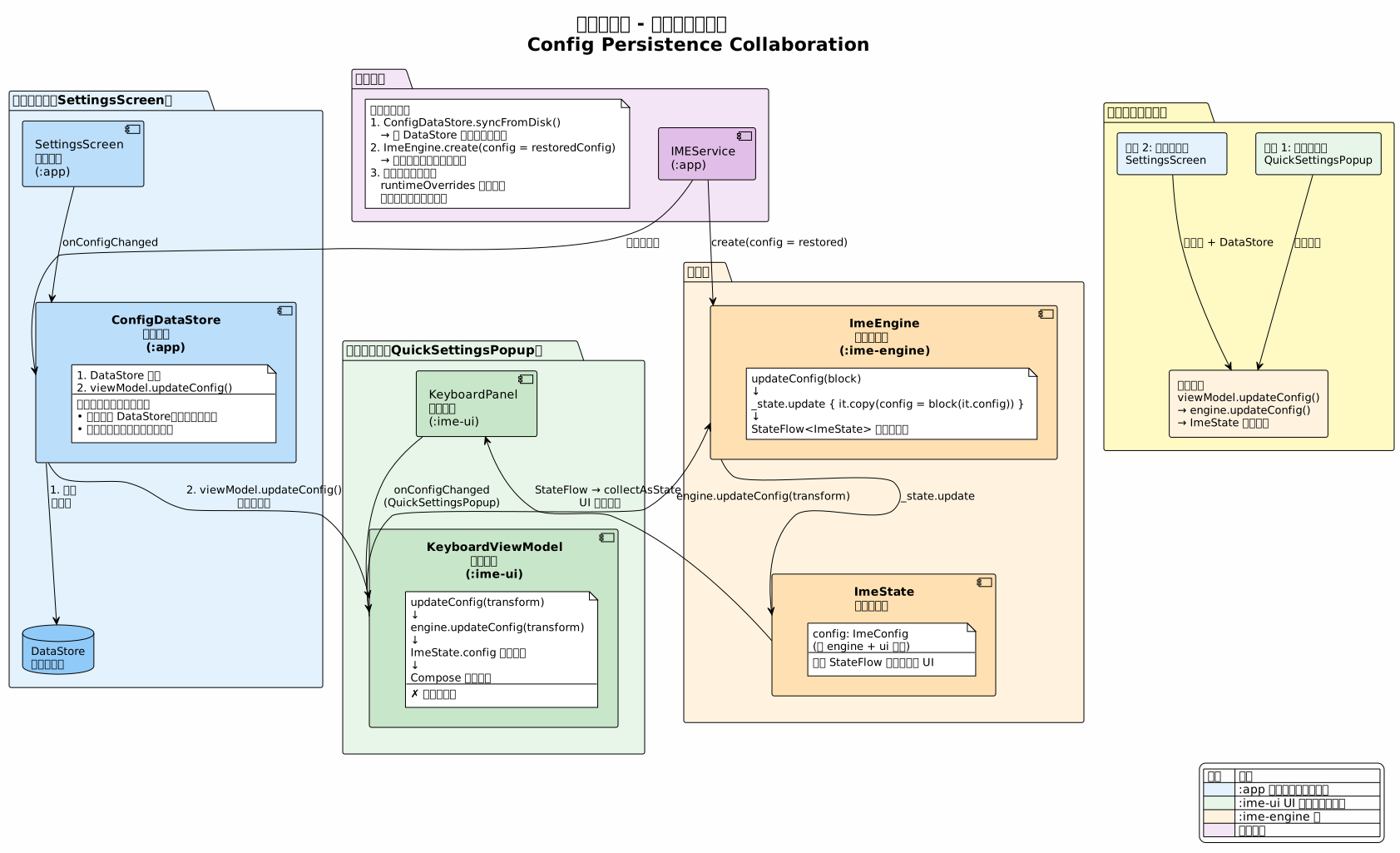
ConfigDataStore(:app)与 KeyboardViewModel(:ime-ui)的协作:
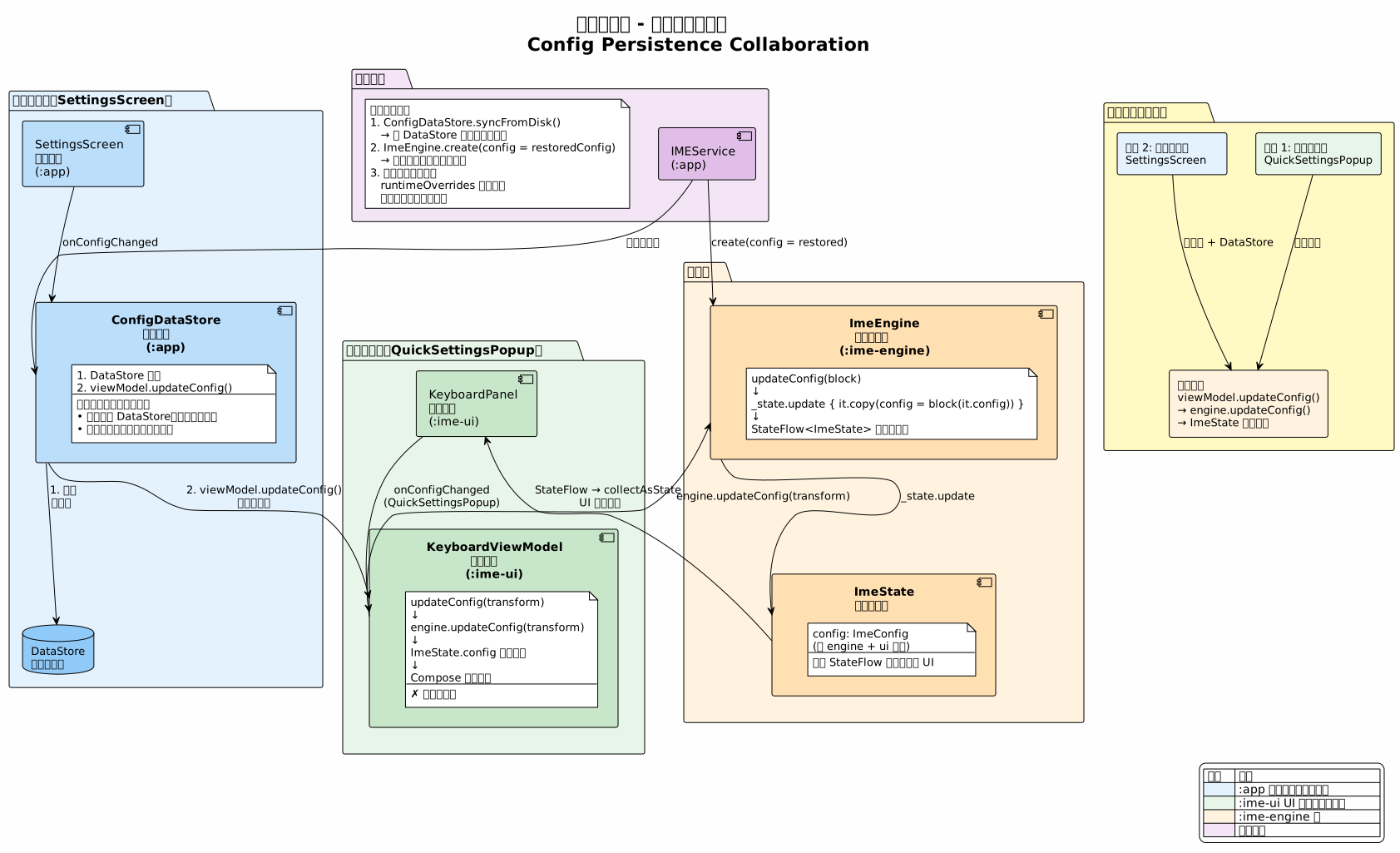
:app 模块在配置变更时需同时执行两个操作:
ConfigDataStore.updateConfig()— 持久化到 DataStoreviewModel.updateConfig()— 修改运行时配置,触发 UI 更新
运行时优先原则保证:通过 QuickSettingsPopup 等键盘 UI 进行的临时修改只调用 viewModel.updateConfig(),不写入 DataStore;重启后由 ConfigDataStore 从 DataStore 恢复配置。
5. 完整数据流
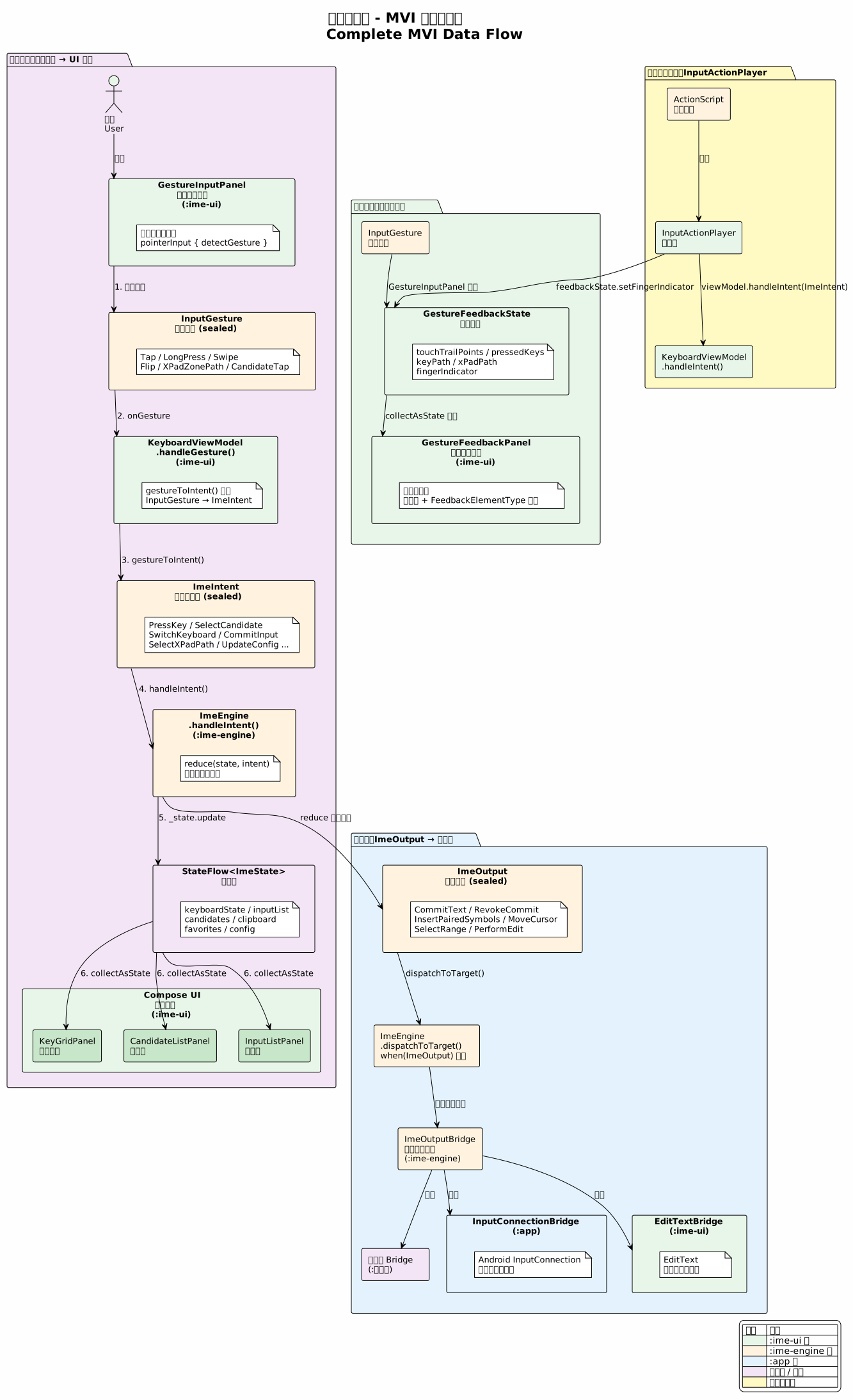
5.1 用户手势输入
5.2 程序化输入(InputActionPlayer)
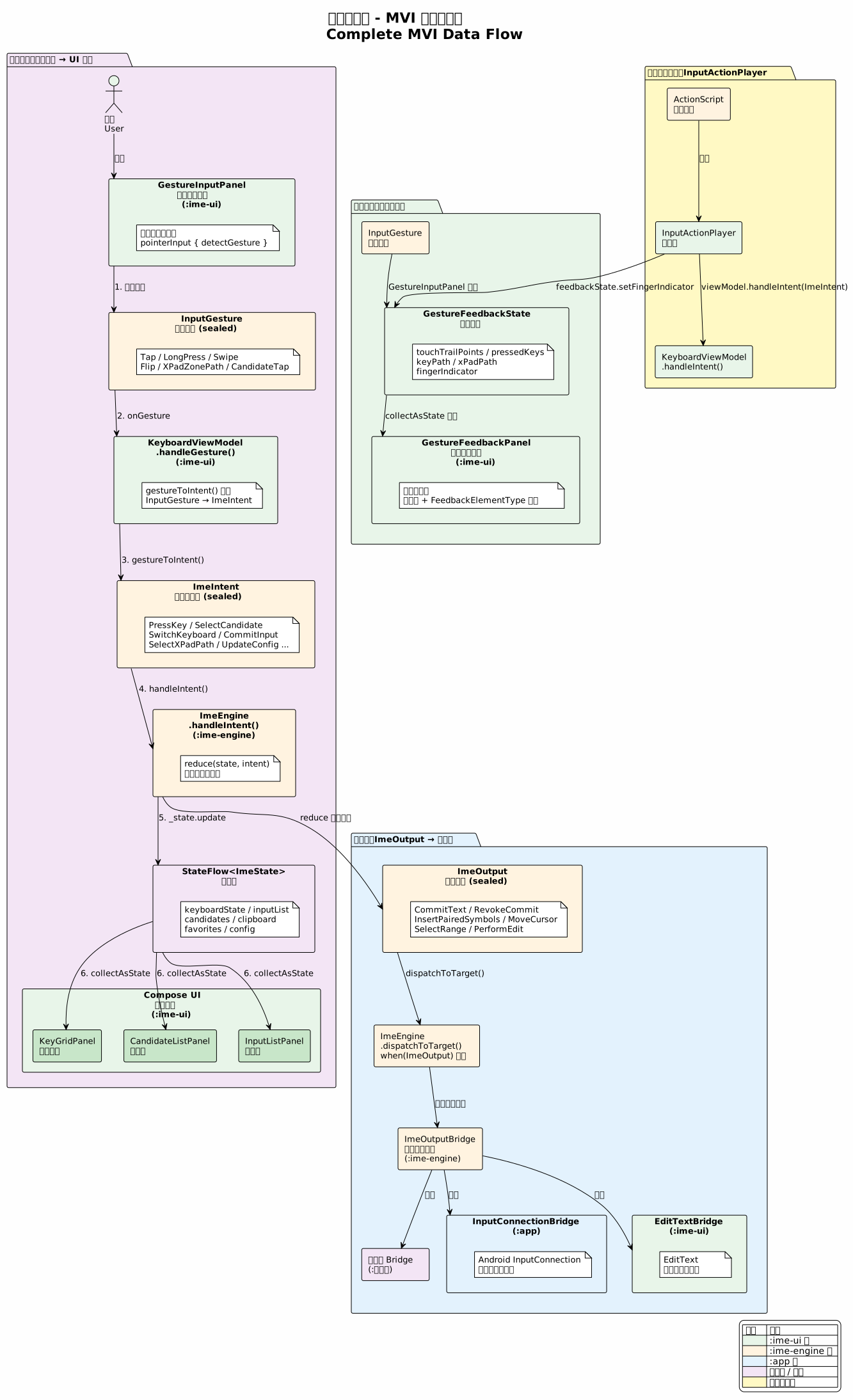
程序化输入路径:ActionScript → InputActionPlayer.executeAction() → viewModel.handleIntent(ImeIntent) → ImeEngine.handleIntent() → (同主数据流)
5.3 配置变更