
Appearance
候选列表与字典系统
1. CandidateList 候选列表模型
CandidateList 管理拼音输入的候选词数据,包括候选词列表(惰性分页加载)、分页控制、过滤状态、加载标记和近似总数。它是一个不可变的 data class,所有变更通过 copy() 生成新实例。候选列表的生命周期与 KeyboardState.CandidateSelection 状态绑定——进入候选选择时加载候选词,退出候选选择时清空列表。CandidateList 是 ImeState 的子状态,引擎在 reduce 函数中根据字典查询结果和用户操作更新候选列表。
kotlin
data class CandidateList(
    /** 当前页的候选词列表(非全量,按需加载) */
    val candidates: List<InputWord> = emptyList(),
    /** 当前页码 */
    val pageIndex: Int = 0,
    /** 每页大小 */
    val pageSize: Int = 20,
    /** 字典中是否还有更多候选词可供加载(用于"加载更多"按钮) */
    val hasMore: Boolean = false,
    /** 查询总结果数(近似值,用于分页控件) */
    val totalApprox: Int = 0,
    /** 应用的过滤条件 */
    val filter: PinyinWordFilter? = null,
) {
    val isEmpty: Boolean get() = candidates.isEmpty()
    val totalPages: Int get() = if (candidates.isEmpty()) 0 else (candidates.size + pageSize - 1) / pageSize
    val currentPage: List<InputWord>
        get() {
            val fromIndex = pageIndex * pageSize
            val toIndex = minOf(fromIndex + pageSize, candidates.size)
            return if (fromIndex >= candidates.size) emptyList()
            else candidates.subList(fromIndex, toIndex)
        }

    fun nextPage(): CandidateList {
        if (candidates.isEmpty()) return this
        val next = (pageIndex + 1) % totalPages
        return copy(pageIndex = next)
    }

    fun prevPage(): CandidateList {
        if (candidates.isEmpty()) return this
        val prev = if (pageIndex == 0) totalPages - 1 else pageIndex - 1
        return copy(pageIndex = prev)
    }

    fun withCandidates(candidates: List<InputWord>): CandidateList =
        copy(candidates = candidates, pageIndex = 0, hasMore = candidates.size >= pageSize)

    fun withFilter(filter: PinyinWordFilter): CandidateList {
        if (filter.isEmpty) return copy(filter = filter, pageIndex = 0)
        val filtered = candidates.filter { filter.matched(it) }
        return copy(filter = filter, pageIndex = 0, candidates = filtered)
    }
}候选列表采用轮播分页模式:nextPage() 翻到下一页,到末页后继续翻页回到首页;prevPage() 翻到上一页,到首页前继续翻页跳到末页。pageSize 默认为 20,与 UI 层的候选面板布局匹配。hasMore 标识字典中是否还有更多候选词可供加载,当查询结果数量等于 pageSize 时 hasMore 为 true,表示字典中可能存在更多匹配项。应用过滤条件后 pageIndex 重置为 0,过滤后的候选列表替换原始列表。若 pageIndex * pageSize >= candidates.size,currentPage 返回空列表而非抛出异常——这种防御式设计避免了过滤后页面越界的问题。
惰性分页加载:查询结果不全部保留在内存中,仅缓存当前页的 candidates。hasMore 标记指示后端还有更多结果。用户翻页到最后一页时,通过 ImeIntent.LoadMoreCandidates 异步加载下一页,结果通过 ImeIntent.SetCandidates 合并到现有列表。totalApprox 为近似总数,仅用于分页指示器显示,无需精确值。
全量保留候选词列表在内存中的场景(如高频汉字 'yi' 返回 200+ 候选词)已被惰性分页替代——每页仅保留 pageSize=20 条,总内存占用从 30-60KB 降至 4-6KB。
CandidateList 的候选词按以下优先级排序:用户输入频率(frequency 高的排前面)→ 字典频率 → HMM 预测概率。用户选择候选词后,引擎通过 ImeDictProvider.recordInput() 更新用户词频,后续查询中该候选词的排序位置提升。这种频率驱动的排序策略使得常用词自然浮动到列表前端,减少用户的翻页次数。
2. InputWord 单词层次
InputWord 是候选词的类型层级,以 sealed class 表达四种候选词类型。所有子类共享 text 和 frequency 字段,各自携带类型特有的语义信息。sealed class 的穷举性保证引擎在处理候选词时编译期覆盖所有类型,不会遗漏新增的候选词类型。InputWord 既是 CandidateList.candidates 的元素类型,也是 InputItem.Char.word 的关联类型,贯穿输入列表和候选列表两大核心数据结构。
kotlin
sealed class InputWord {
    abstract val text: String
    abstract val frequency: Int

    data class Pinyin(
        override val text: String,
        override val frequency: Int,
        val spell: Spell?,
        val variant: Variant?,
        val radical: Radical?,
        val tone: Tone?,
    ) : InputWord()

    data class PinyinPhrase(
        override val text: String,
        override val frequency: Int,
        val spells: List<String>,
    ) : InputWord()

    data class Emoji(
        override val text: String,
        override val frequency: Int = 0,
        val name: String,
        val group: String,
    ) : InputWord()

    data class Latin(
        override val text: String,
        override val frequency: Int,
    ) : InputWord()
}InputWord.Pinyin 是最复杂的子类型,包含拼音拼写、繁体变体、部首和声调等中文输入特有的属性。spell 字段记录拼音拼写的标识和值,用于拼写过滤和双拼/注音切换;variant 字段记录繁体/异体变体文本和类型,用于繁简切换;radical 字段记录部首文本和笔画数,用于高级过滤中的部首筛选;tone 字段枚举五个声调值,用于声调过滤。InputWord.PinyinPhrase 是多字词组,记录各字的拼音拼写序列(spells),用于词组补全和拼音分解显示。InputWord.Emoji 包含名称(name)和分组(group)信息,用于 Emoji 键盘的分类浏览和搜索。InputWord.Latin 最为简单,仅包含文本和频次,用于英文输入的候选建议。
四种候选词类型覆盖了输入法的所有候选来源:Pinyin 和 PinyinPhrase 来自拼音字典查询,Emoji 来自 Emoji 数据集,Latin 来自用户输入历史。每种类型的查询路径不同——Pinyin 和 PinyinPhrase 通过 DictRepository 的 lookupPinyinWords() 和 lookupPinyinPhrases() 查询,Emoji 通过预加载的 Emoji 数据集过滤,Latin 通过 UserInputDao 的 getCompletions() 查询。类型系统确保引擎在处理候选词时不会混淆不同来源的数据。
2.1 辅助类型
kotlin
data class Spell(val id: String, val value: String)

data class Variant(val text: String, val type: VariantType)

data class Radical(val text: String, val strokeCount: Int)

enum class Tone { Tone1, Tone2, Tone3, Tone4, Neutral }

enum class SpellUsedMode { FullPinyin, DoublePinyin, Bopomofo }

enum class VariantType { Traditional, Variant }Spell 记录拼音拼写的标识(id)和值(value),id 用于拼写去重和索引,value 用于显示和过滤。双拼方案下,同一个字的 Spell.value 可能与全拼不同(如 "zh" 在双拼中映射为 "v"),Spell.id 保持不变以支持拼写切换时的正确映射。Variant 记录繁体/异体变体文本(text)和类型(type),用于繁简切换提交选项。Radical 记录部首文本(text)和笔画数(strokeCount),用于部首过滤中的笔画排序。Tone 枚举了五个声调值(一声到四声 + 轻声),用于声调过滤。SpellUsedMode 控制拼音字的显示形式:FullPinyin 显示完整拼音,DoublePinyin 显示双拼编码,Bopomofo 显示注音符号。VariantType 区分繁体(Traditional)和异体(Variant)两种变体类型——繁体是简体的对应正体字,异体是同一字的其他书写形式。
3. PinyinWordFilter 过滤器
PinyinWordFilter 是候选列表的过滤条件,支持按声调和拼写两个维度筛选拼音候选词。过滤条件为空时 isEmpty 返回 true,此时候选列表不应用任何过滤,所有候选词按原始排序展示。matched() 方法判断一个 InputWord 是否满足过滤条件——非 InputWord.Pinyin 类型直接返回 false(过滤仅对拼音字生效),InputWord.Pinyin 类型需同时满足声调和拼写两个维度(若对应维度条件非空)。过滤逻辑在 CandidateSelection.Filtering 状态下生效。
kotlin
data class PinyinWordFilter(
    val tones: Set<Tone> = emptySet(),
    val spells: Set<Spell> = emptySet(),
) {
    val isEmpty: Boolean get() = tones.isEmpty() && spells.isEmpty()

    fun matched(word: InputWord): Boolean {
        if (word !is InputWord.Pinyin) return false
        if (tones.isNotEmpty() && word.tone !in tones) return false
        if (spells.isNotEmpty() && word.spell !in spells) return false
        return true
    }

    fun withTone(tone: Tone): PinyinWordFilter =
        copy(tones = tones + tone)

    fun withoutTone(tone: Tone): PinyinWordFilter =
        copy(tones = tones - tone)

    fun withSpell(spell: Spell): PinyinWordFilter =
        copy(spells = spells + spell)

    fun withoutSpell(spell: Spell): PinyinWordFilter =
        copy(spells = spells - spell)

    fun clear(): PinyinWordFilter = PinyinWordFilter()
}声调过滤适用于同音字较多的拼音序列——例如拼音 "shi" 对应数十个汉字,用户可以通过指定声调(如四声)快速缩小候选范围。拼写过滤适用于双拼或注音场景——不同拼写映射可能对应不同的字集,用户可以通过选择拼写缩小候选范围。两个维度的过滤条件是 AND 关系:同时指定声调和拼写时,候选词必须同时满足两个条件。withTone() 和 withoutTone() 方法支持声调的增减切换,withSpell() 和 withoutSpell() 方法支持拼写的增减切换,clear() 方法清除所有过滤条件。
过滤后的候选列表通过 CandidateList.withFilter() 方法更新:withFilter() 先调用 filter.matched() 过滤候选词,然后用过滤后的列表替换原始候选列表,pageIndex 重置为 0。退出 CandidateSelection.Filtering 状态时,引擎重新加载未过滤的完整候选列表,恢复过滤前的排序和分页状态。过滤操作不影响字典查询——过滤是候选列表加载后的二次筛选,不触发新的字典查询请求。
4. ImeDictProvider 字典接口
ImeDictProvider 是 :engine 对外暴露的字典查询公共接口,定义了拼音字词查询、前缀查询和用户输入记录三个核心方法。接口与实现分离的设计允许第三方应用替换整个字典层——例如使用远程字典服务替代本地 SQLite,或使用自定义的候选排序算法——而无需修改引擎核心逻辑。ImeDictProvider 是引擎与字典数据之间的唯一契约,引擎不直接依赖任何具体的字典实现。
kotlin
interface ImeDictProvider {
    /** 根据完整拼音查询候选词 */
    fun query(pinyin: String): List<InputWord>

    /** 根据拼音前缀查询候选词(支持模糊匹配) */
    fun queryPrefix(prefix: String): List<InputWord>

    /** 记录用户输入,更新用户词频 */
    fun recordInput(pinyin: String, word: String)

    /** 查询拉丁词补全 */
    fun queryLatinCompletions(prefix: String): List<InputCompletion.LatinWord>

    /** 查询拼音词组补全 */
    fun queryPhraseCompletions(prefix: String): List<InputCompletion.PhraseWord>
}query() 方法根据完整拼音字符串查询候选词,返回按频率排序的 List<InputWord>。查询结果包含 InputWord.Pinyin(单字)和 InputWord.PinyinPhrase(词组)两种类型,混合排序后返回。queryPrefix() 方法根据拼音前缀查询候选词,支持模糊匹配——用户输入部分拼音时即可获得候选建议,无需输入完整拼音。recordInput() 方法记录用户选择,更新用户输入频率,影响后续查询的排序。queryLatinCompletions() 和 queryPhraseCompletions() 分别查询拉丁词和拼音词组的补全建议。
字典查询限制:单次查询最多返回 maxResults=100 条结果。超出部分可通过翻页或"加载更多"获取。查询结果按频率排序后截断,确保高频候选词优先展示。词组查询沿用 LIMIT 20 的限制。
4.1 ImeSqliteDictProvider 实现
ImeSqliteDictProvider 是 ImeDictProvider 的默认实现,基于 Room SQLite 数据库。它内部委托 DictRepository 完成数据库操作,委托 PinyinCharsTree 完成前缀匹配,委托 HmmModel 完成短语预测。三层委托的职责清晰分离:PinyinCharsTree 负责快速前缀查找,DictRepository 负责精确字词查询,HmmModel 负责上下文感知的短语预测。
kotlin
class ImeSqliteDictProvider(
    private val dictRepository: DictRepository,
    private val pinyinCharsTree: PinyinCharsTree,
    private val hmmModel: HmmModel,
) : ImeDictProvider {

    override fun query(pinyin: String): List<InputWord> {
        val words = dictRepository.lookupPinyinWords(pinyin)
        val phrases = dictRepository.lookupPinyinPhrases(pinyin)
        return mergeAndSort(words, phrases)
    }

    override fun queryPrefix(prefix: String): List<InputWord> {
        val matches = pinyinCharsTree.find(prefix)
        if (matches == null) return emptyList()
        val words = dictRepository.lookupByPrefix(prefix)
        return words
    }

    override fun recordInput(pinyin: String, word: String) {
        dictRepository.recordUserInput(word, "pinyin")
    }

    override fun queryLatinCompletions(prefix: String): List<InputCompletion.LatinWord> {
        return dictRepository.getLatinCompletions(prefix)
    }

    override fun queryPhraseCompletions(prefix: String): List<InputCompletion.PhraseWord> {
        val phrases = dictRepository.lookupPinyinPhrases(prefix)
        return phrases.map { InputCompletion.PhraseWord(it.text, "", it.spells) }
    }

    private fun mergeAndSort(
        words: List<InputWord.Pinyin>,
        phrases: List<InputWord.PinyinPhrase>,
    ): List<InputWord> {
        val all = mutableListOf<InputWord>()
        all.addAll(words)
        all.addAll(phrases)
        return all.sortedByDescending { it.frequency }
    }
}查询流程分为四步:首先通过 PinyinCharsTree 进行前缀匹配获取候选拼音集合,然后通过 DictRepository 查询精确字词,接着通过 HmmModel + ViterbiDecoder 计算上下文感知的短语预测排序,最后合并用户词频和收藏权重生成最终排序列表。这四步查询流程在 query() 和 queryPrefix() 方法中按需组合——完整拼音查询使用精确字词 + HMM 排序,前缀查询使用前缀匹配 + 精确字词。recordInput() 方法委托 DictRepository.recordUserInput() 异步更新用户输入频率,频率更新在独立协程中执行,不阻塞主线程。
5. DictRepository 字典仓库
DictRepository 是引擎内部基于 Room 的字典访问仓库,封装所有数据库操作并提供协程化的异步接口。DictRepository 是 ImeSqliteDictProvider 的内部实现细节——引擎对外暴露的公共接口是 ImeDictProvider,第三方应用通过实现 ImeDictProvider 替换整个字典层时无需了解 DictRepository 的存在。DictRepository 通过 Room DAO 接口访问 SQLite 数据库,将数据库实体(Entity)映射为领域模型(InputWord、InputCompletion、InputFavorite)。
5.1 Entity 定义
kotlin
@Entity(tableName = "pinyin_word", indices = [Index(value = ["spell"])])
data class PinyinWordEntity(
    @PrimaryKey(autoGenerate = true) val id: Long = 0,
    @ColumnInfo(name = "spell") val spell: String,
    @ColumnInfo(name = "text") val text: String,
    @ColumnInfo(name = "freq") val freq: Int,
    @ColumnInfo(name = "variant") val variant: String? = null,
    @ColumnInfo(name = "variant_type") val variantType: String? = null,
    @ColumnInfo(name = "radical") val radical: String? = null,
    @ColumnInfo(name = "stroke_count") val strokeCount: Int? = null,
    @ColumnInfo(name = "tone") val tone: Int? = null,
)

@Entity(tableName = "pinyin_phrase", indices = [Index(value = ["spells"])])
data class PinyinPhraseEntity(
    @PrimaryKey(autoGenerate = true) val id: Long = 0,
    @ColumnInfo(name = "spells") val spells: String,
    @ColumnInfo(name = "text") val text: String,
    @ColumnInfo(name = "freq") val freq: Int,
)

@Entity(tableName = "user_input_data", indices = [Index(value = ["text", "type"], unique = true)])
data class UserInputEntity(
    @PrimaryKey(autoGenerate = true) val id: Long = 0,
    @ColumnInfo(name = "text") val text: String,
    @ColumnInfo(name = "type") val type: String,
    @ColumnInfo(name = "freq") val freq: Int,
    @ColumnInfo(name = "last_used") val lastUsed: Long,
)

@Entity(tableName = "user_input_favorite", indices = [Index(value = ["text"], unique = true)])
data class FavoriteEntity(
    @PrimaryKey(autoGenerate = true) val id: Long = 0,
    @ColumnInfo(name = "text") val text: String,
    @ColumnInfo(name = "type") val type: String? = null,
    @ColumnInfo(name = "usage_count") val usageCount: Int,
    @ColumnInfo(name = "created_at") val createdAt: Long,
)PinyinWordEntity 是拼音字的数据库实体,包含拼写、文本、频率、变体、部首和声调等字段。PinyinPhraseEntity 是拼音词组的数据库实体,spells 字段以逗号分隔存储各字拼音(如 "zhong,guo"),text 为词组文本,freq 为字典频率。UserInputEntity 是用户输入记录的数据库实体,type 区分输入类型("pinyin"、"latin"、"phrase"),freq 为用户使用频率,lastUsed 为最后使用时间戳。FavoriteEntity 是用户收藏的数据库实体,type 为文本类型(复用 InputTextType 的值),usageCount 为使用次数,createdAt 为创建时间。
5.2 DAO 接口
kotlin
@Dao
interface PinyinWordDao {
    @Query("SELECT * FROM pinyin_word WHERE spell = :spell ORDER BY freq DESC")
    suspend fun lookupBySpell(spell: String): List<PinyinWordEntity>

    @Query("SELECT * FROM pinyin_word WHERE spell LIKE :prefix || '%' ORDER BY freq DESC LIMIT :limit")
    suspend fun lookupByPrefix(prefix: String, limit: Int = 50): List<PinyinWordEntity>

    @Query("SELECT DISTINCT spell FROM pinyin_word WHERE spell LIKE :prefix || '%' ORDER BY spell")
    suspend fun lookupSpellsByPrefix(prefix: String): List<String>

    @Query("SELECT * FROM pinyin_word WHERE spell = :spell AND variant IS NOT NULL ORDER BY freq DESC")
    suspend fun lookupVariants(spell: String): List<PinyinWordEntity>
}

@Dao
interface PinyinPhraseDao {
    @Query("SELECT * FROM pinyin_phrase WHERE spells LIKE :spellPrefix || '%' ORDER BY freq DESC LIMIT :limit")
    suspend fun lookupBySpellPrefix(spellPrefix: String, limit: Int = 20): List<PinyinPhraseEntity>

    @Query("SELECT * FROM pinyin_phrase WHERE spells = :spells ORDER BY freq DESC")
    suspend fun lookupBySpells(spells: String): List<PinyinPhraseEntity>
}

@Dao
interface UserInputDao {
    @Query("SELECT * FROM user_input_data WHERE type = :type ORDER BY freq DESC LIMIT :limit")
    suspend fun getTopByType(type: String, limit: Int = 100): List<UserInputEntity>

    @Query("SELECT * FROM user_input_data WHERE text LIKE :prefix || '%' AND type = :type ORDER BY freq DESC LIMIT :limit")
    suspend fun getCompletions(prefix: String, type: String, limit: Int = 20): List<UserInputEntity>

    @Insert(onConflict = OnConflictStrategy.REPLACE)
    suspend fun upsert(entity: UserInputEntity)

    @Query("UPDATE user_input_data SET freq = freq + 1, last_used = :timestamp WHERE text = :text AND type = :type")
    suspend fun incrementFrequency(text: String, type: String, timestamp: Long)

    @Query("DELETE FROM user_input_data")
    suspend fun clearAll()
}

@Dao
interface FavoriteDao {
    @Query("SELECT * FROM user_input_favorite ORDER BY usage_count DESC, created_at DESC")
    fun getAllFlow(): Flow<List<FavoriteEntity>>

    @Query("SELECT * FROM user_input_favorite ORDER BY usage_count DESC, created_at DESC")
    suspend fun getAll(): List<FavoriteEntity>

    @Insert(onConflict = OnConflictStrategy.REPLACE)
    suspend fun upsert(entity: FavoriteEntity)

    @Query("DELETE FROM user_input_favorite WHERE text = :text")
    suspend fun delete(text: String)

    @Query("DELETE FROM user_input_favorite")
    suspend fun clearAll()
}PinyinWordDao 提供四种查询方法:lookupBySpell() 精确匹配拼音查询候选字,lookupByPrefix() 前缀匹配查询候选字,lookupSpellsByPrefix() 查询匹配前缀的所有拼音拼写(用于自动补全拼音输入),lookupVariants() 查询指定拼音的繁体/异体变体。PinyinPhraseDao 提供两种查询方法:lookupBySpellPrefix() 前缀匹配查询词组,lookupBySpells() 精确匹配拼音序列查询词组。UserInputDao 提供频率查询、补全查询、频率更新和清空操作,incrementFrequency() 使用 SQL 原子操作递增频率避免并发冲突。FavoriteDao 提供响应式查询(getAllFlow() 返回 Flow)、一次性查询、upsert、删除和清空操作。
5.3 DictRepository 仓库类
kotlin
class DictRepository(
    private val wordDao: PinyinWordDao,
    private val phraseDao: PinyinPhraseDao,
    private val userInputDao: UserInputDao,
    private val favoriteDao: FavoriteDao,
    private val hmmDao: HmmDao,
) {
    suspend fun lookupPinyinWords(spell: String): List<InputWord.Pinyin> =
        wordDao.lookupBySpell(spell).map { it.toDomain() }

    suspend fun lookupPinyinPhrases(spells: String): List<InputWord.PinyinPhrase> =
        phraseDao.lookupBySpells(spells).map { it.toDomain() }

    suspend fun lookupByPrefix(prefix: String): List<InputWord> {
        val words = wordDao.lookupByPrefix(prefix).map { it.toDomain() }
        val phrases = phraseDao.lookupBySpellPrefix(prefix).map { it.toDomain() }
        return (words + phrases).sortedByDescending { it.frequency }
    }

    suspend fun predictPhrase(
        currentSpell: String,
        context: List<String>,
    ): List<InputWord.PinyinPhrase> {
        val candidates = hmmDao.predictNextStates(currentSpell)
        return candidates.flatMap { phraseDao.lookupBySpells(it).map { e -> e.toDomain() } }
    }

    suspend fun getLatinCompletions(prefix: String): List<InputCompletion.LatinWord> =
        userInputDao.getCompletions(prefix, "latin").map { it.toCompletion() }

    suspend fun recordUserInput(text: String, type: String) {
        userInputDao.incrementFrequency(text, type, System.currentTimeMillis())
    }

    fun observeFavorites(): Flow<List<InputFavorite>> =
        favoriteDao.getAllFlow().map { entities -> entities.map { it.toDomain() } }

    private fun PinyinWordEntity.toDomain(): InputWord.Pinyin = InputWord.Pinyin(
        text = text, frequency = freq,
        spell = Spell(id = id.toString(), value = spell),
        variant = variant?.let { Variant(it, VariantType.valueOf(variantType ?: "Traditional")) },
        radical = radical?.let { Radical(it, strokeCount ?: 0) },
        tone = tone?.let { Tone.entries.getOrNull(it) },
    )

    private fun PinyinPhraseEntity.toDomain(): InputWord.PinyinPhrase = InputWord.PinyinPhrase(
        text = text, frequency = freq, spells = spells.split(","),
    )

    private fun UserInputEntity.toCompletion(): InputCompletion.LatinWord =
        InputCompletion.LatinWord(text = text, remaining = text.removePrefix(text))

    private fun FavoriteEntity.toDomain(): InputFavorite = InputFavorite(
        text = text, type = type?.let { InputTextType.detect(it) },
        usageCount = usageCount, createdAt = createdAt,
    )
}DictRepository 的核心价值在于将 Room 的数据访问层(DAO + Entity)映射为引擎的领域模型(InputWord + InputCompletion + InputFavorite)。toDomain() 扩展方法负责 Entity 到领域模型的转换,处理可空字段和枚举映射。lookupByPrefix() 方法合并字词和词组的查询结果,按频率统一排序后返回混合类型的候选列表。predictPhrase() 方法通过 HmmDao 预测下一个可能的拼音状态,再查询对应的词组候选。recordUserInput() 使用 SQL 原子操作递增频率,确保并发场景下频率计数的一致性。
6. PinyinCharsTree 前缀树
PinyinCharsTree 是拼音前缀树(Trie),用于快速前缀匹配。前缀树在拼音输入场景下的核心价值是:用户输入部分拼音时,引擎可以快速找到所有匹配该前缀的候选拼音序列,为自动补全和模糊匹配提供基础数据。PinyinCharsTree 在引擎初始化时从字典数据构建,构建后为不可变数据结构,所有查询操作为纯函数,无需同步。
kotlin
data class PinyinCharsTree(
    val children: Map<Char, PinyinCharsTree> = emptyMap(),
    val keys: List<InputKey.Char> = emptyList(),
) {
    /** 查找指定前缀的子树 */
    fun find(prefix: String): PinyinCharsTree? {
        if (prefix.isEmpty()) return this
        val first = prefix.first()
        return children[first]?.find(prefix.drop(1))
    }

    /** 获取所有可达字符 */
    fun allReachableChars(): Set<Char> = children.keys

    /** 收集所有可达的按键 */
    fun allReachableKeys(): List<InputKey.Char> {
        val result = mutableListOf<InputKey.Char>()
        result.addAll(keys)
        for (child in children.values) {
            result.addAll(child.allReachableKeys())
        }
        return result
    }

    /** 构建器 */
    class Builder {
        private val nodes = mutableMapOf<String, MutableMap<Char, PinyinCharsTree>>()

        fun addPath(path: String, key: InputKey.Char): Builder {
            var current = nodes.getOrPut("") { mutableMapOf() }
            for (c in path) {
                val child = current.getOrPut(c) { PinyinCharsTree() }
                current = nodes.getOrPut(path.substring(0, path.indexOf(c) + 1)) { mutableMapOf() }
            }
            return this
        }

        fun build(): PinyinCharsTree {
            return PinyinCharsTree()
        }
    }
}PinyinCharsTree 的 children 是以字符为键的子树映射,每个字符对应拼音序列的下一个可能字符。keys 是当前节点关联的按键列表,用于六边形键盘的滑行输入场景——当用户滑行到某个位置时,引擎可以快速获取该位置对应的所有可达按键。find() 方法沿前缀字符逐层查找子树,返回匹配前缀的子树根节点;若前缀不匹配任何路径,返回 null。allReachableChars() 返回当前节点的所有直接子字符,用于自动补全——UI 层可以高亮显示下一个可能的输入字符。
PinyinCharsTree.Builder 提供增量构建能力,addPath() 方法逐字符构建 Trie 路径,build() 方法生成不可变的 PinyinCharsTree 实例。构建过程在引擎初始化时执行一次,从字典中加载所有拼音拼写构建完整的前缀树。前缀树的查询时间复杂度为 O(m),其中 m 为前缀长度,与字典规模无关——这使得前缀匹配在大字典场景下仍然高效。
7. HmmModel 隐马尔可夫模型
HmmModel 是拼音输入的隐马尔可夫模型,用于上下文感知的短语预测。隐马尔可夫模型将拼音序列视为观测序列,将汉字序列视为隐藏状态序列,通过转移概率和发射概率建模拼音到汉字的映射关系。HmmModel 的核心应用场景是:用户输入一个字后,引擎根据上下文预测下一个可能的字或词组,将预测结果排序后插入候选列表前端,减少用户的翻页次数。
kotlin
@JvmInline
value class HmmState(val value: String)

@JvmInline
value class HmmObservation(val value: String)

data class HmmModel(
    val states: Set<HmmState>,
    val observations: Set<HmmObservation>,
    val initialProb: Map<HmmState, Double>,
    val transitionProb: Map<HmmState, Map<HmmState, Double>>,
    val emissionProb: Map<HmmState, Map<HmmObservation, Double>>,
) {
    /** 获取从某状态转移到另一状态的概率 */
    fun transitionProb(from: HmmState, to: HmmState): Double =
        transitionProb[from]?.get(to) ?: 0.0

    /** 获取某状态发射某观测值的概率 */
    fun emissionProb(state: HmmState, observation: HmmObservation): Double =
        emissionProb[state]?.get(observation) ?: 0.0

    /** 获取某状态的初始概率 */
    fun initialProb(state: HmmState): Double =
        initialProb[state] ?: 0.0
}HmmState 使用 @JvmInline value class 封装汉字字符串,HmmObservation 使用 @JvmInline value class 封装拼音字符串,类型安全的同时避免装箱开销。states 为所有可能的隐藏状态(汉字)集合,observations 为所有可能的观测值(拼音)集合,initialProb 为初始状态概率分布,transitionProb 为状态转移概率矩阵(从 HmmState 到 HmmState 的概率映射),emissionProb 为发射概率矩阵(从 HmmState 到 HmmObservation 的概率映射)。三个概率矩阵使用不可变 Map 存储,查询操作为纯函数。
7.1 ViterbiDecoder
ViterbiDecoder 实现维特比算法,用于给定观测序列(拼音序列)求解最可能的隐藏状态序列(汉字序列)。维特比算法是动态规划算法,时间复杂度为 O(n·k²),其中 n 为观测序列长度,k 为状态数量。对于拼音输入场景,n 通常为 2-6(词组长度),k 为候选字数量(通常 < 50),计算开销可控。
kotlin
class ViterbiDecoder(private val model: HmmModel) {

    data class DecodeResult(
        val states: List<HmmState>,
        val probability: Double,
    )

    suspend fun decode(observations: List<HmmObservation>): List<DecodeResult> =
        withContext(Dispatchers.Default) {
            if (observations.isEmpty()) return@withContext emptyList()

            val results = mutableListOf<DecodeResult>()
            val viterbi = Array(observations.size) { mutableMapOf<HmmState, Double>() }
            val backpointer = Array(observations.size) { mutableMapOf<HmmState, HmmState>() }

            // 初始化
            for (state in model.states) {
                val p = model.initialProb(state) * model.emissionProb(state, observations[0])
                if (p > 0.0) {
                    viterbi[0][state] = p
                }
            }

            // 递推
            for (t in 1 until observations.size) {
                for (currState in model.states) {
                    var maxProb = 0.0
                    var bestPrev: HmmState? = null
                    for (prevState in viterbi[t - 1].keys) {
                        val p = viterbi[t - 1][prevState]!! *
                            model.transitionProb(prevState, currState) *
                            model.emissionProb(currState, observations[t])
                        if (p > maxProb) {
                            maxProb = p
                            bestPrev = prevState
                        }
                    }
                    if (maxProb > 0.0 && bestPrev != null) {
                        viterbi[t][currState] = maxProb
                        backpointer[t][currState] = bestPrev
                    }
                }
            }

            // 回溯获取最优路径
            val lastStates = viterbi.last().entries.sortedByDescending { it.value }
            for (entry in lastStates.take(5)) {
                val path = mutableListOf<HmmState>()
                var state: HmmState = entry.key
                for (t in observations.size - 1 downTo 1) {
                    path.add(0, state)
                    state = backpointer[t][state] ?: break
                }
                path.add(0, state)
                if (path.size == observations.size) {
                    results.add(DecodeResult(path, entry.value))
                }
            }

            results
        }
}ViterbiDecoder.decode() 方法在 Dispatchers.Default 上执行计算密集型的维特比算法,避免阻塞主线程。返回 List<DecodeResult> 而非单个结果,提供 Top-5 候选路径供排序使用。DecodeResult 包含状态序列(汉字序列)和对应概率,引擎根据概率将 HMM 预测结果与字典查询结果合并排序。维特比算法的三个阶段——初始化(计算初始概率 × 发射概率)、递推(动态规划计算最大概率路径)、回溯(从终态回溯获取完整路径)——严格按照算法标准实现,backpointer 数组记录每一步的最优前驱状态用于回溯。
8. 查询流程
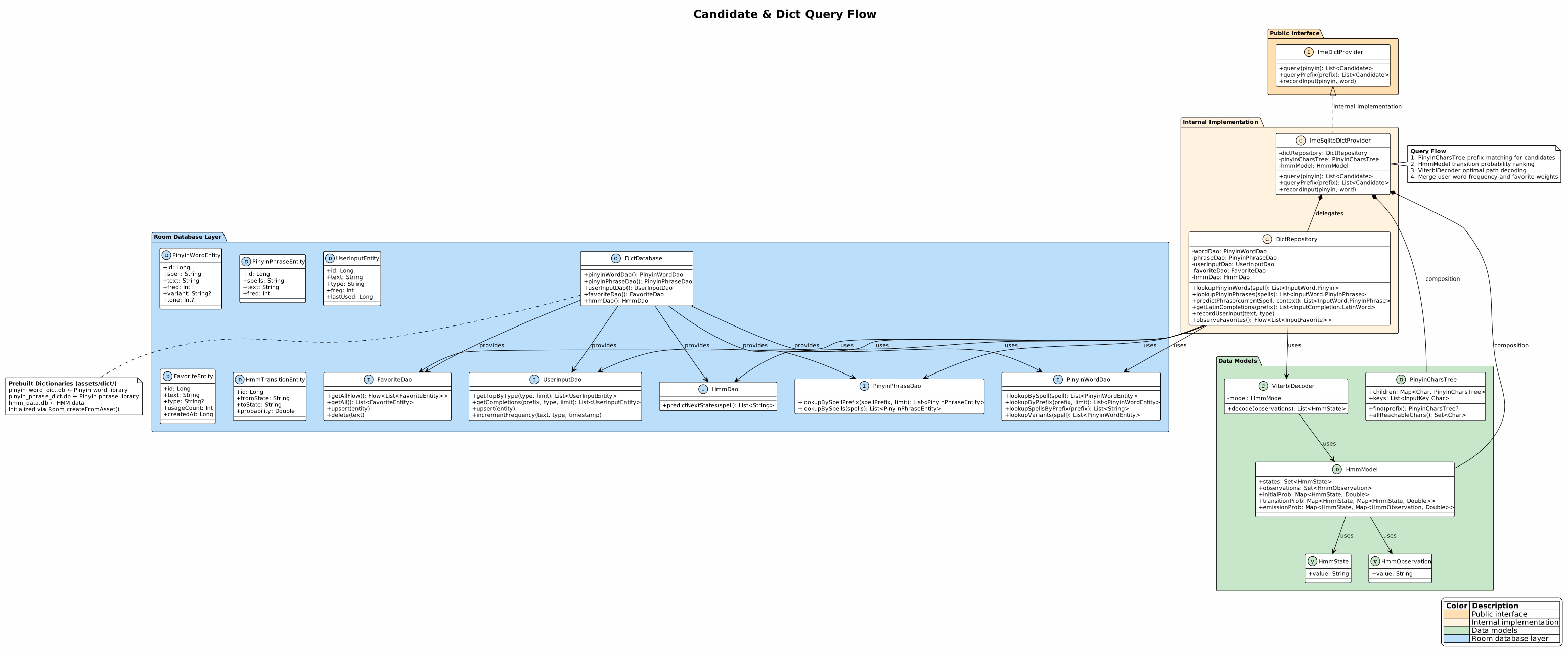
字典查询的完整流程从用户按键触发到候选列表渲染,经过四个阶段:前缀匹配 → 精确查询 → HMM 排序 → 用户频率合并。每个阶段有明确的输入输出和职责边界,阶段之间通过数据流串联,整体流程在引擎的 reduce 函数中编排。
8.1 阶段一:前缀匹配
用户输入拼音字符后,引擎首先通过 PinyinCharsTree.find() 执行前缀匹配,快速确定当前输入的拼音前缀是否合法。前缀匹配的结果为一个子树,包含所有以该前缀开头的候选拼音序列。若前缀不匹配任何路径(用户输入了无效的拼音组合),引擎在候选列表中显示空状态,提示用户修正输入。前缀匹配的时间复杂度为 O(m),m 为前缀长度,与字典规模无关,保证了查询的实时性。
前缀匹配的另一个用途是限制后续精确查询的搜索范围——引擎只查询与前缀匹配的拼音字词,避免全表扫描。PinyinCharsTree.allReachableChars() 返回当前前缀下所有可达的下一个字符,UI 层据此高亮显示可输入的按键,引导用户输入有效的拼音序列。
8.2 阶段二:精确查询
前缀匹配确认合法性后,引擎通过 DictRepository 执行精确的字典查询。查询分为两条路径:lookupPinyinWords() 查询单字候选,lookupPinyinPhrases() 查询词组候选。两条路径的查询在独立协程中并行执行,查询结果通过 mergeAndSort() 方法合并——字词候选按频率降序统一排序,高频候选排在前端。
精确查询的 SQL 语句使用 LIKE :prefix || '%' 前缀匹配索引,配合 spell 和 spells 字段上的索引,查询性能在百万级数据量下仍然可控。查询结果通过 toDomain() 方法从 Room Entity 映射为领域模型,处理可空字段和枚举转换。
8.3 阶段三:HMM 排序
引擎在精确查询结果之上执行 HMM 短语预测。HmmModel 接收当前拼音作为观测值,结合上文已输入的汉字作为上下文,通过 ViterbiDecoder.decode() 计算最可能的汉字序列。HMM 预测的结果为 Top-5 候选路径,每条路径包含一个汉字序列和对应概率。
HMM 预测结果与精确查询结果的合并策略是:预测结果的概率归一化后与字典频率线性加权。默认配置下,HMM 预测结果的权重较低(0.3),字典频率的权重较高(0.7)——这确保了字典频率作为基础排序依据的稳定性,HMM 预测作为辅助排序信号提供上下文感知的微调。
8.4 阶段四:用户频率合并
最终阶段将用户输入历史中的频率数据合并到候选排序中。DictRepository.recordUserInput() 在用户每次选择候选词后异步更新用户频率——频率递增操作使用 SQL 原子语句 SET freq = freq + 1,确保并发安全。查询时,用户频率通过 UserInputDao.getTopByType() 获取,与字典频率加权合并后影响候选排序。
用户频率合并的策略是:若候选词存在于用户输入历史中,使用用户频率替换字典频率作为排序依据;若不存在,使用字典频率。这种策略确保了用户常用词始终排在列表前端——即使用户常用词在字典中的频率较低(如人名、专业术语),用户频率的提升也会将其推到列表前端。
四个阶段的完整查询流程确保了候选列表的质量:前缀匹配保证查询范围合法,精确查询提供基础候选集,HMM 排序引入上下文感知能力,用户频率合并反映个性化偏好。四个阶段的组合使得拼音输入的候选排序既准确又个性化,减少用户的翻页和选择成本。
8.5 字典查询异步化
字典查询通过 sideEffects 异步执行:当 KeyboardStateMachine 产生查询需求时,返回 ImeIntent.LoadCandidates(pinyin) 作为 sideEffect。ImeEngine 的工作队列将其分发到 Dispatchers.Default 协程执行,查询结果通过 ImeIntent.SetCandidates(candidates) 重新回到 reduce 处理链。
LoadCandidates 和 SetCandidates 已整合到 ImeIntent sealed class 中,定义见 engine/060-intent-editor-action-bridge.md。
kotlin
data class LoadCandidates(val pinyin: String) : ImeIntent()
data class SetCandidates(val candidates: CandidateList) : ImeIntent()

// ImeEngine 中异步处理
private fun handleAsyncIntent(intent: ImeIntent) {
    when (intent) {
        is ImeIntent.LoadCandidates -> {
            scope.launch(Dispatchers.Default) {
                val candidates = dictProvider.query(intent.pinyin)
                handleIntent(ImeIntent.SetCandidates(candidates))
            }
        }
        // ...
    }
}查询流程:Prefix matching → (sideEffect) → DB query on Default → Viterbi on Default → SetCandidates → reduce
字典查询通过 Dispatchers.Default 异步化后,主线程仅处理缓存命中场景(纯 Trie 查找),DB I/O 和 Viterbi 计算不阻塞 UI 线程。
8.6 字典查询错误处理
字典查询失败处理:当 ImeDictProvider.query() 或 ImeDictProvider.queryPrefix() 抛出异常(数据库损坏、IO 错误等)时,由 LoadCandidates 的协程作用域捕获并记录错误日志。引擎保持当前候选列表不变,不替换为空列表——用户看到的仍是上次查询结果,而非空白候选栏。数据库初始化失败在 ImeSqliteDictProvider 构造时即抛出,遵循 Fail Fast 原则。